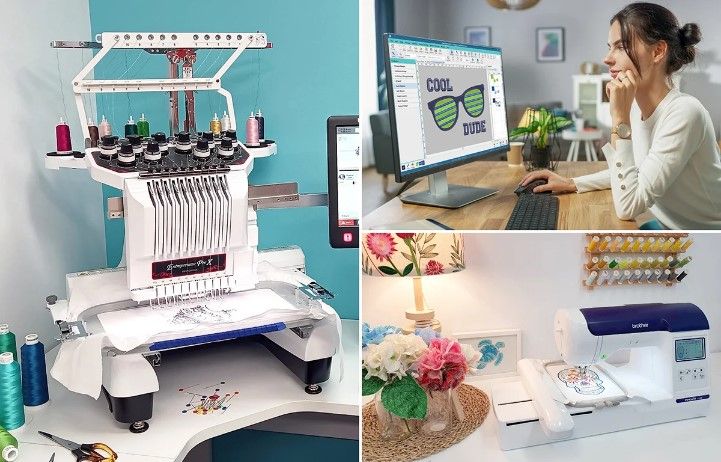
What to Know Before Changing Embroidery File Formats
Changing embroidery file formats may look simple at first. But it is actually a very careful process. Every embroidery machine reads files in its own way. If the format is wrong or not prepared well, the design can look broken, uneven, or even fail to stitch.
Many embroidery shops use a PES File Converter to help change file types for different machines. This step is important because embroidery machines cannot read normal image files. They need special stitch-based formats that match their system. A wrong conversion can damage stitch flow, density, or design shape.
File conversion is not just a button click job. It involves understanding stitch structure, machine rules, and design behavior. Every change in format can affect how the embroidery looks on fabric.
In this guide, we will explain what you need to know before changing embroidery file formats and how to avoid common mistakes that affect stitch quality.
What Are Embroidery File Formats?
Embroidery file formats are special digital files used by embroidery machines.
They store stitch instructions instead of images.
Common Embroidery File Types
DST
PES
EXP
JEF
VP3
Each Machine Uses Different Formats
Not all machines support the same file type.
Formats Control Stitch Behavior
They decide how the design will stitch on fabric.
Why File Formats Matter in Embroidery
File format affects how the machine reads the design.
Wrong Format Can Cause Errors
Machines may skip stitches or distort designs.
Correct Format Improves Quality
Proper files create smooth stitching.
Format Affects Machine Speed
Clean files help machines run better.
File Conversion Is Not Always Simple
Many people think converting files is easy.
But embroidery conversion is technical work.
It Is Not Just Changing File Name
The structure inside the file changes.
Stitch Data Must Stay Intact
Poor conversion can damage stitch instructions.
Design Quality Can Be Affected
Wrong conversion leads to poor embroidery output.
What Happens During File Conversion
File conversion changes how embroidery data is stored.
Stitch Points Are Rewritten
The machine reads new instructions.
Thread Colors May Change
Some formats handle colors differently.
Stitch Paths Can Be Adjusted
Good conversion keeps stitch flow smooth.
Risks of Poor File Conversion
Wrong file conversion can cause problems.
Broken Stitch Patterns
Design may lose structure.
Uneven Embroidery
Stitches may not align properly.
Thread Breaks
Poor data can increase machine stress.
Fabric Damage
Wrong stitching may pull fabric.
Why Digitizing Quality Matters First
File conversion depends on good digitizing.
Bad Digitizing Creates Bad Files
Errors carry into all formats.
Good Digitizing Improves Conversion
Clean stitch data stays stable.
Professional Setup Reduces Errors
Experts prepare files for multiple formats.
Many embroidery businesses trust Digitizing Buddy because experienced digitizers create clean and stable embroidery files that convert properly across different machines.
Different Machines Need Different Formats
Each embroidery machine brand has its own system.
Brother Machines Use PES
Very common in home embroidery.
Tajima Machines Use DST
Used in commercial embroidery.
Janome Uses JEF
Works with home embroidery systems.
Bernina Uses EXP
Supports specific machine types.
Format Matching Is Very Important
Wrong format may not run at all.
Things to Check Before Changing Formats
Before converting a file, you must check key details.
Stitch Density
It must stay balanced after conversion.
Stitch Path
It should remain smooth and logical.
Design Size
Some formats may change scaling.
Color Information
Not all formats support full color data.
Common Mistakes in File Conversion
Many beginners make simple mistakes.
Using Online Converters Without Checking
Automatic tools may damage stitch data.
Ignoring Machine Type
Wrong format selection causes errors.
Losing Stitch Control
Some conversion tools remove details.
Not Testing After Conversion
Skipping test runs can lead to failures.
How Professionals Handle File Conversion
Experts follow a careful process.
Step 1: Review Original File
They check stitch quality first.
Step 2: Prepare Clean Digitized File
They fix issues before conversion.
Step 3: Choose Correct Format
They match file to machine type.
Step 4: Test Stitch Output
They run sample embroidery tests.
Step 5: Adjust If Needed
They fix small issues after testing.
Why Testing After Conversion Is Important
Testing ensures quality control.
It Finds Hidden Errors
Some problems only appear on fabric.
It Improves Final Stitch Quality
Adjustments make designs better.
It Saves Time and Material
Early fixes prevent waste.
How File Conversion Affects Design Quality
Conversion impacts final embroidery results.
Stitch Density May Change
Too many or too few stitches can appear.
Design Shape May Shift
Poor conversion can distort layout.
Thread Flow May Be Interrupted
Bad files create uneven stitching.
Importance of Clean Source Files
Good conversion starts with clean input files.
Clean Files Convert Better
Less error during format change.
Proper Stitch Planning Helps
Good design structure stays stable.
Professional Setup Improves Results
Experts prepare files correctly for conversion.
Experience Matters in File Conversion
Not all conversions are the same.
Skilled Professionals Understand Formats
They know machine requirements.
They Prevent Conversion Errors
Experience reduces mistakes.
They Improve Stitch Consistency
Better files mean better embroidery.
Many embroidery businesses rely on Digitizing Buddy because experienced teams know how to handle embroidery file conversion with accuracy and care.
Tips Before Changing Embroidery File Formats
Simple steps can help improve results.
Always Keep Original File
Never overwrite master design.
Check Machine Compatibility
Confirm supported formats first.
Avoid Low Quality Converters
Use trusted tools or experts.
Always Test Stitch Output
Testing prevents final errors.
Work With Professionals
Expert help improves quality.
Future of Embroidery File Formats
Embroidery technology is evolving.
More Universal Formats Are Coming
Machines may become more flexible.
Software Is Getting Smarter
Tools now preserve stitch data better.
Human Skill Still Matters
Experts are still needed for quality control.
Final Thoughts
Changing embroidery file formats is more than a simple conversion task. It requires understanding machine behavior, stitch structure, and design quality.
A wrong file format can ruin an otherwise good embroidery design. But with proper preparation, clean digitizing, and careful conversion, embroidery results stay smooth and professional.
Experienced professionals ensure that files remain accurate across different machines and formats. This leads to better stitching, fewer errors, and stronger embroidery quality overall.
In embroidery work, successful file conversion always starts with clean design and expert handling.
Appreciate the creator