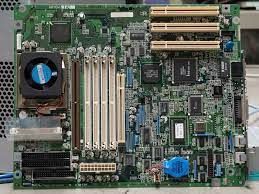
What Is a Form Factor of a Motherboard?
If you're building a PC or upgrading your existing one, you've likely come across the term "form factor" when looking for a motherboard. But what exactly is a form factor, and why is it important?
In this blog post, we'll dive into the world of motherboard form factors and everything you need to know about them.
A motherboard is the central component of a computer that connects all the other parts together, including the CPU, RAM, and storage devices.
According to Before Its News, The form factor of a motherboard refers to its physical size and shape, as well as the location of its components.
The most common form factors for desktop motherboards are ATX (Advanced Technology eXtended), Micro-ATX, and Mini-ITX.
The ATX form factor is the largest and most popular, while Micro-ATX and Mini-ITX are smaller and designed for more compact cases.
ATX Form Factor
The ATX form factor was introduced by Intel in 1995 and has since become the most widely used motherboard form factor.
ATX motherboards measure 12 x 9.6 inches and are designed to fit into standard-sized cases.
They have seven expansion slots and typically support multiple graphics cards and other high-end components.
ATX motherboards are ideal for gaming and enthusiast builds, as they offer a lot of room for expansion and can support high-end hardware.
They also tend to have more ports and connectors than smaller form factors, making them more versatile.
Micro-ATX Form Factor
Micro-ATX motherboards are smaller than ATX but still offer much expandability. They measure 9.6 x 9.6 inches and typically have four expansion slots.
Micro-ATX motherboards are designed for smaller cases and are a good choice for budget builds or home theater PCs.
Despite their smaller size, Micro-ATX motherboards still offer many of the features of larger form factors, including support for multiple storage drives, multiple graphics cards, and high-speed memory.
Mini-ITX Form Factor
Mini-ITX motherboards are the smallest form factor for desktop PCs, measuring just 6.7 x 6.7 inches.
They have only one expansion slot and are designed for compact cases and small form factor builds.
Mini-ITX motherboards are a good choice for home theater PCs, media centers, or other applications where space is limited.
They are also popular among enthusiasts who want to build compact gaming systems or portable workstations.
Other Form Factors
While ATX, Micro-ATX, and Mini-ITX are the most common form factors for desktop motherboards, there are several other form factors that are less widely used. These include:
Extended ATX (E-ATX): A larger version of the ATX form factor with more expansion slots and ports.
FlexATX: A smaller form factor designed for low-power systems and thin clients.
Nano-ITX: An even smaller form factor than Mini-ITX, designed for embedded systems and other specialized applications.
FAQs
Q: What does the term "form factor" mean in relation to motherboards?
A: The term "form factor" refers to the physical size and shape of a motherboard, as well as the location of its components.
Q: What are the most common form factors for desktop motherboards?
A: The most common form factors for desktop motherboards are ATX, Micro-ATX, and Mini-ITX.
Q: What is the difference between ATX, Micro-ATX, and Mini-ITX motherboards?
A: ATX motherboards are the largest and most expandable, while Micro-ATX motherboards are smaller and more budget-friendly. Mini-ITX motherboards are the smallest and designed for compact builds.
Q: Can you use any form factor of the motherboard with any case?
A: No, you need to ensure that the form factor of your motherboard is compatible with the case you are using. Most cases are designed to fit one or more specific form factors.
Q: What are some other less common motherboard form factors?
A: Other less common motherboard form factors include Extended ATX (E-ATX), FlexATX, and Nano-ITX.
Q: Do smaller form factor motherboards sacrifice performance?
A: Not necessarily. While smaller motherboards may have fewer expansion slots and ports, they can still offer high-end performance with the right hardware.
Q: Can I switch to a different form factor motherboard without changing other components?
A: It depends on the form factors and the components you use. Switching to a smaller form factor motherboard may require replacing other components, such as the power supply or graphics card, to ensure compatibility.
Conclusion:
In conclusion, the form factor of a motherboard is an important consideration when building or upgrading a PC.
The most common form factors for desktop motherboards are ATX, Micro-ATX, and Mini-ITX, each with its own advantages and disadvantages.
When choosing a form factor, it's important to consider the size of your case, your budget, and your hardware needs.
Whether you're building a high-end gaming rig or a compact media center, there's a motherboard form factor that's right for you.
So, next time you're shopping for a motherboard, make sure to take into account the form factor to ensure compatibility with your case and other components.
And remember, a well-chosen motherboard form factor can make all the difference in the performance and usability of your PC. Happy building!
Appreciate the creator