Export Thunderbird Emails Using the Thunderbird to Pst Converter
The use of email clients is a very important and ongoing trend in communication that is now required by everyone. The question of "How to Convert Thunderbird to PST?" or "How to Export PST from Thunderbird?" arises frequently because data transfer from one email client to another is also a common issue.
Download Now
Therefore, if you're looking for answers to these questions, this post is the best resource for you.
In relation to Microsoft Outlook and Mozilla Thunderbird
Although Mozilla Thunderbird exports emails in EML format using drag and drop, it is an open-source program that saves data to local drives in mbox and Maildir. In contrast, the user requires a PST or MSG file in order to open or import data into Outlook.
So, users are very curious about how to convert Thunderbird to PST.
However, Microsoft Outlook has more sophisticated features that make it simple to meet modern communication needs while also offering hassle-free service.
To convert emails from Thunderbird to PST, EML, or MSG format and gain more advantages, use Mozilla Thunderbird to PST Converter.
Continuous Conversion
Completely Secure Output
Completed migration
Transforming Thunderbird MBOX to Outlook PST: A method
Any user can select one of the methods listed below to Export Thunderbird to Outlook PST.
Installing the Eudora email client is Method 1.
The user can migrate Thunderbird emails in PST format using older versions of Outlook's option to import Eudora mailboxes.
Install Eudora and set it up with a fake account on the system where Outlook is already installed.
The Thunderbird mailbox should be copied and pasted into Eudora's mailbox (C:\Documents and Settings\USER\Application Data\Qualcomm\Eudora\)
Now change the mailbox's inbox mbox extension to inbox mbx. The same data structure is shared by the family of formats known as MBOX, MBX, and MBS.
Launch the Microsoft Outlook email program, then select the File tab.
Choose "import internet mail and address" in the pop-up window after selecting the Import-Export tool option, and then click the next button.
Select the 2x, 3x, or 4x option in the wizard for Eudora (Pro and Light), then click the Next button.
Select your Mozilla Thunderbird data by browsing the Eudora file location and pressing next.
Save the location where you want to import a PST-formatted Thunderbird mailbox.
Then press the "Finish" button and wait for the procedure to be completed. You can then restart Microsoft Outlook and check your mailbox.
Using the email client Outlook Express
Installing and configuring Outlook Express on the same computer as MS Outlook is required in order to export PST from Thunderbird.
Thunderbird can export emails in the EML file format, but these files cannot be directly imported into Microsoft Outlook. Outlook Express is one of the tools the user needs because of this.
Launch Outlook Express after exporting your Mozilla Thunderbird email in EML format.
Press the Import Email Messages button after clicking the Add File button.
Choose the Thunderbird EML mailbox and click OK.
Click the Finish button when you're finished.
The user can then choose the Outlook Express option in the Import-Export wizard rather than Eudora and proceed with the first method to import Outlook Express data into MS Outlook.
The first and second methods' drawbacks
With the most recent version of MS Outlook, the user does not use the aforementioned procedure.
One Thunderbird mailbox can only be moved at once.
There is a strong likelihood that the folder structure will collapse.
Method 3: To export emails from Thunderbird to PST, use Mozilla Thunderbird to PST Converter.
This straightforward solution is perfect for you if you don't want a detailed walkthrough approach. Anyone can convert Thunderbird email to PST with the help of the Mozilla Thunderbird to PST converter in just a few simple steps.
This is a very helpful and effective program that offers a user accurate results with a variety of features. You can export multiple mailboxes from Thunderbird to PST at once thanks to the straightforward interface of the solution, which does not require any technical expertise.
How to Export Thunderbird Messages as PST
On any Windows-based operating system, download the DailySoft Thunderbird to PST Converter Tool, install it, and start using it.
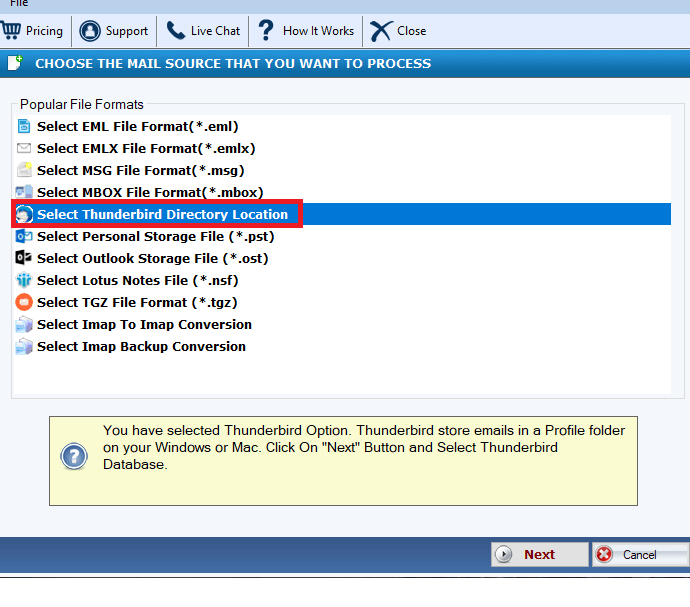
Launch the application, then select Browse. To load the entire TB mailbox at once, select Auto-load from the menu.

After loading and scanning the mailbox, select PST file format with a single or separate PST conversion option by clicking the Export button.
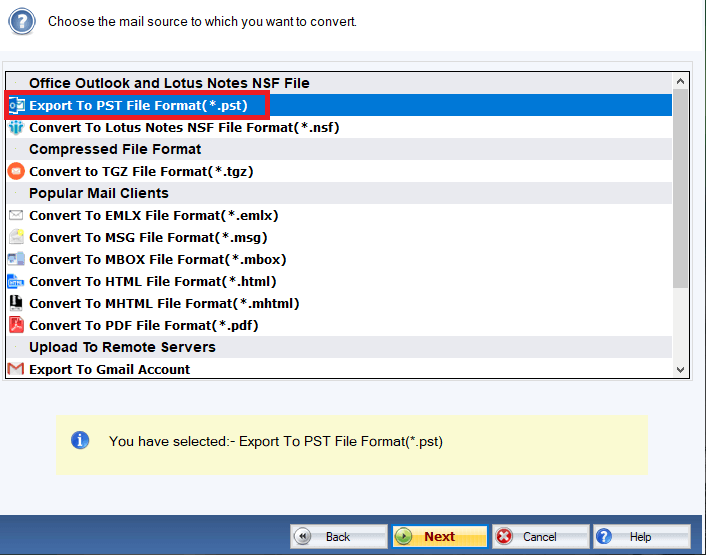
After converting, select the destination, and then click the Export button once more to save the data.
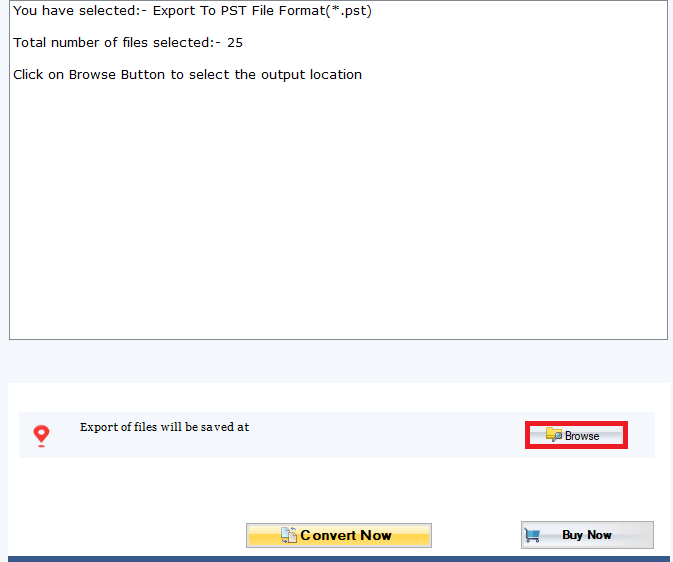
Wait for the conversion of Thunderbird to PST to finish; you will see a process window. The data can then be opened in Outlook 2019, 2016, 2013, 2010, and other earlier versions by going to the destination.
Conclusion
Here, we've covered both manual and automatic methods for exporting a Thunderbird mailbox to PST format. Even though the manual method has some drawbacks, you can still use it as needed. Additionally, you can test the Mozilla Thunderbird to PST solution's free trial version and export a few emails from each mailbox.
Appreciate the creator