Cloud SQL vs Firestore in 2026: A Complete Comparison Guide for CTOs and Engineering Leads
Introduction
If you are building an application on Google Cloud, you will compare Cloud SQL and Firestore at some point. Cloud SQL is a managed relational database that runs MySQL, PostgreSQL, or SQL Server. Firestore is a managed NoSQL document database that syncs data to mobile and web clients in real time.
Both are managed by Google, but they work in very different ways, and you cannot easily switch once the application is being developed.
In my experience, most teams pick the database that is the fastest to set up in the prototype phase, not the one that fits the workload. That strategy works until the queries get harder. A Firestore app that needs to group orders by region and month has to pull every document into the backend and compute it there. A Cloud SQL app that needs live updates on a mobile client has to be paired with Pub/Sub or a WebSocket server to get close to what Firestore does natively.
This article is for CTOs and engineering leads who want a clear answer on which database, Cloud SQL vs Firestore, fits their application.
Cloud SQL vs Firestore: Comparison Table at a Glance
Here’s a tabular comparison between CloudSQL and Firestore for a quicker overview of the differences across multiple decision factors.
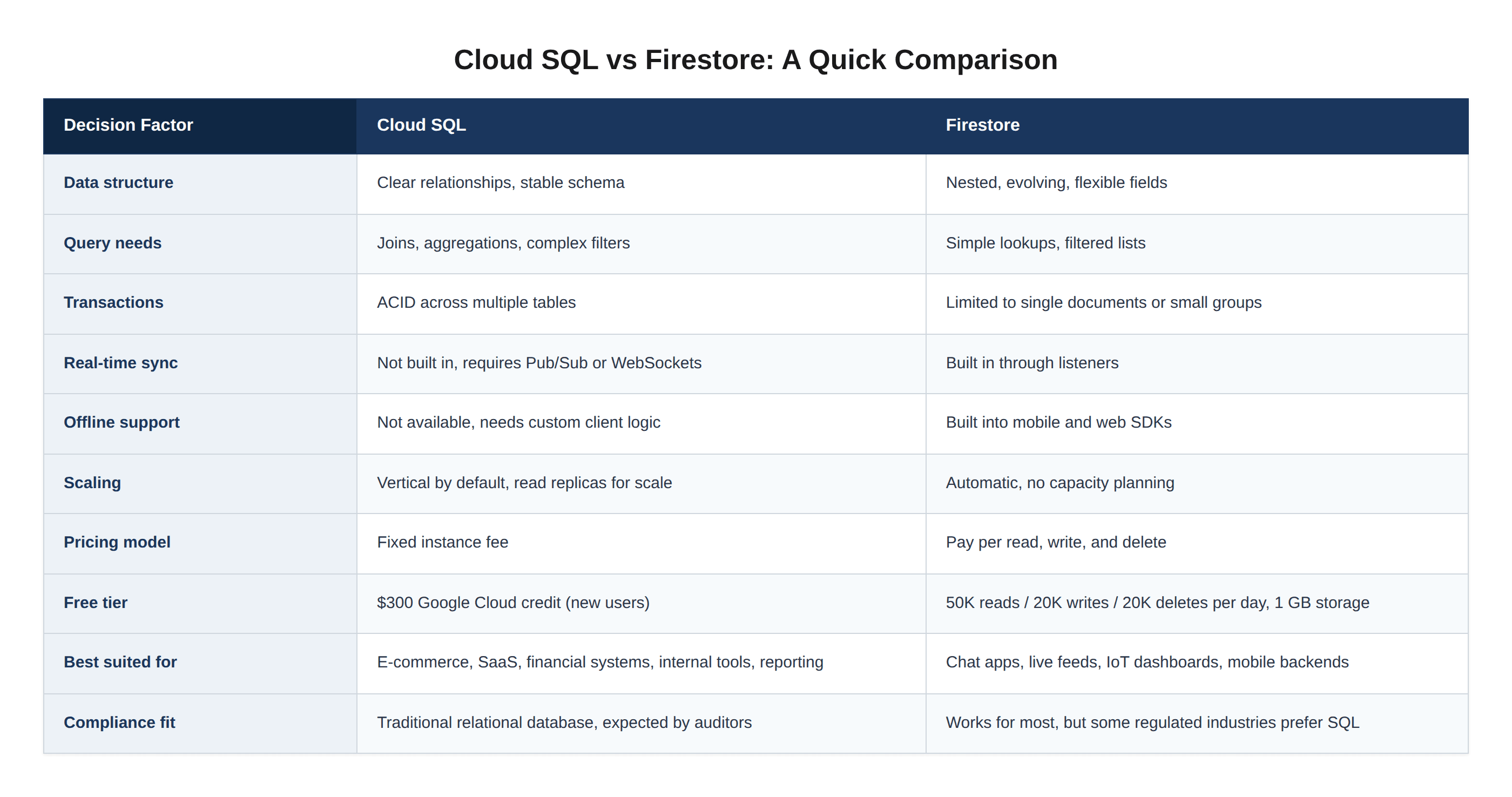
After this quick comparison, let us now explore the six key differences between Cloud SQL and Firestore in detail.
5 Key Differences Between Cloud SQL and Firestore
I have compared Cloud SQL and Firestore on the five points that matter when you actually use them in production: data model, querying, real-time capabilities, scaling, and pricing.
1. Data Model
The most important difference between Cloud SQL vs Firestore is how each one stores data.
Cloud SQL stores data in tables. You define columns, pick data types, set foreign keys between tables, and the database checks all of it. If you have used MySQL, PostgreSQL, or SQL Server, CloudSQL will feel easy to work with.
Firestore stores data as documents grouped into collections. A document is a JSON object. It can contain nested fields, arrays, and subcollections. There is no schema, so two documents in the same collection can look completely different.
Choose CloudSQL for transactional systems, financial data, and any application where reporting or analytics will be part of the product. Firestore is the better choice when your data is nested by nature, such as messages inside a chat thread or events inside a user session, and when the shape of that data is likely to change as the product grows.
2. Querying Capabilities
Both databases support queries, but the range of what you can ask is very different.
Cloud SQL gives you the full power of SQL, which means joins across tables, aggregations, window functions, subqueries, and complex filters all run inside the database.
Firestore is more limited. You can filter on one or two fields, sort, and paginate within a single collection. Joins across collections are not supported, and aggregations across collections have to be handled in your backend code.
For reporting dashboards, analytics, or any workload that needs to combine data from multiple sources, Cloud SQL handles it natively. Firestore is built for direct reads and writes, not heavy analytical workloads.
3. Real-time Sync and Offline Support
Firestore comes with real-time listeners built in. A client sets up a listener on a document or a query, and Firestore sends the new data to the client every time something changes. The SDKs also store a local copy of the data on the device, which means the app can read and write while offline. When the device is back online, Firestore syncs any writes that happened in the meantime.
Cloud SQL does not offer either of these features. Real-time sync and offline behavior must be built manually, usually with WebSockets, a message broker, or a separate caching layer.
For chat apps, collaborative tools, live dashboards, or any mobile experience where users expect instant updates, Firestore is the best choice. The tricky part is making sure the listeners, security rules, and document structure are set up in a way that does not blow up your read bill later. If that matters for your product, hire Firebase developers who have previous experience with similar projects.
4. Scaling Behavior
The Cloud SQL vs Firestore choice also comes down to how each one can scale when required.
Cloud SQL scales vertically by default. You pick an instance size, and for more capacity, you either resize the instance or add read replicas. Cloud SQL also supports horizontal scaling through read replicas and the Enterprise Plus edition, but the primary write node remains a single instance.
Firestore scales automatically. There are no instances to provision and no capacity to plan. The database grows with traffic, and Google handles the data distribution behind the scenes.
For workloads with unpredictable or highly variable traffic, Firestore removes the capacity planning problem. For workloads with steady, predictable loads, Cloud SQL gives teams more control over performance and cost.
5. Pricing Model
The price comparison between Cloud SQL vs Firestore is where teams most often get surprised, because the two products charge for completely different things.
With Cloud SQL, you pay for the instance you run. Whether the database handles ten queries an hour or ten thousand, the instance cost, storage cost, and network cost stay in the same range. The pricing is predictable and easy to forecast.
Firestore charges for what you use. Reads cost $0.06 per 100,000 document reads, writes cost $0.18 per 100,000, and deletes cost $0.02 per 100,000, plus storage and network fees.
This makes Firestore extremely cheap for low-traffic apps and predictable for usage-based billing. But it also makes it expensive for read-heavy workloads like analytics dashboards, where a single page load can trigger tens of thousands of reads. Cloud SQL's fixed instance pricing often wins for high traffic or reporting-driven applications.
Cloud SQL vs Firestore: When to Choose Which
The comparison table at the top of this guide covers the feature-by-feature differences. For quick decision-making, here's how to think about it in terms of use cases.
Choose Cloud SQL when:
You need joins, aggregations, or complex SQL queries
Data has clear relationships and a stable schema
Reporting, BI, or analytics is part of the product
You need full ACID transactions across multiple tables
Compliance or auditors expect a traditional relational database
Choose Firestore when:
Your app is mobile-first or needs real-time sync
Data is naturally nested (chat, sessions, catalogs with variants)
The schema will evolve rapidly as the product grows
You want zero capacity planning and serverless auto-scaling
Offline support is a core user experience requirement
Final Thoughts
Cloud SQL and Firestore are both good databases. They are just good at different things. Cloud SQL handles structured data and serious queries. Firestore handles flexible documents and live updates to clients.
Most of the teams I have worked with end up using both. Cloud SQL holds the core business data like users, accounts, orders, and invoices. Firestore powers the parts of the product that need to feel instant, like chat, notifications, and live dashboards for end users. This is usually a better design than trying to force one database to do everything.
The hardest part is making the decision between Cloud SQL vs Firestore, before the architecture is in place. If you are not sure which way to go, you can hire GCP developers with proven experience across Cloud SQL, Firestore, and the rest of the Google Cloud development stack to help you make the right decision and implement it successfully.
Frequently Asked Questions (FAQs)
1. When should I use Cloud SQL?
Use Cloud SQL when your application needs structured data, complex queries, or reporting. It fits e-commerce, SaaS, financial systems, and any product where dashboards or analytics are part of the roadmap.
2. When should I use Firestore?
Use Firestore when your application is mobile-first and needs data to sync to clients as it changes. It fits chat apps, live feeds, IoT dashboards, and products where data is nested or the fields change as the product grows.
3. Can I use both Cloud SQL and Firestore in the same application?
Yes, and many teams do. Cloud SQL holds the structured business data like users, orders, and invoices, while Firestore powers the real-time features like chat, notifications, and live dashboards.
4. What is the biggest mistake teams make when choosing between Cloud SQL vs Firestore?
Picking Firestore for prototype speed without thinking about how the application will be queried later. Firestore cannot join collections or aggregate across them, so the moment you need reporting, you end up rebuilding on Cloud SQL anyway.
Appreciate the creator