Azure SRE Agent vs Traditional Monitoring: What's the Difference?
Ask any team what their monitoring really costs, and the true answer is not the tools. It is the hours. All that time goes into reading dashboards, chasing alerts, and piecing together what broke across a stack of tools, Azure Monitor, Datadog, Grafana, and the rest, that never quite talk to each other. That manual work is a job in itself, one that sits on top of every tool you run. Azure SRE Agent takes over that job. It pulls the separate tools and the manual effort into one agent that watches, diagnoses, and fixes by itself. That is the heart of Azure SRE Agent vs traditional monitoring: the old way leaves the work to you, while the agent does it on its own.
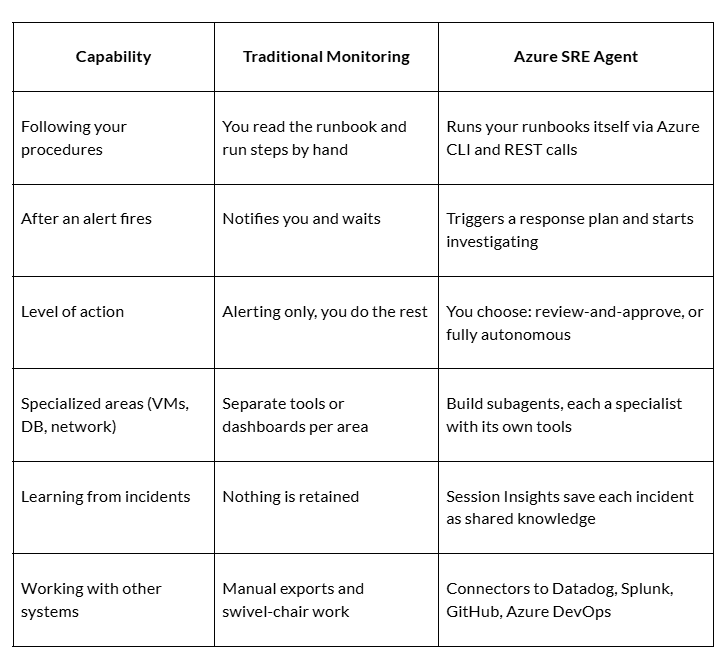
Azure SRE Agent vs Traditional Monitoring: Capability Comparison Table
Both watch over your systems, but they take very different roles once something goes wrong. The table below lays them out side by side, so you can see exactly where each one fits.
What Azure SRE Agent Actually Does
It works hand in hand with your Azure setup. Here is what that looks like in practice:
It follows your fix-it guides: Say your team has a written guide for fixing a website's "500 error." The agent reads that guide and carries out each step itself, checking the database, the recent deployments, and so on, the same way your engineer would.
You decide how much it can do alone: You connect it to your alert system, such as Azure Monitor or PagerDuty. For each type of alert, you set the limit: either it suggests a fix and waits for your "yes," or it goes ahead and fixes the problem without asking.
You can give it specialists: Instead of one agent doing everything, you can create focused ones, a database agent, a networking agent, each set up to handle problems in its own area.
It keeps a record of every fix: When an incident ends, it writes down what broke, what fixed it, and what to watch for. Next time a similar issue appears, that record helps it solve the problem faster.
It plugs into the tools you already use: Connect it to Datadog, Splunk, GitHub, or Azure DevOps, and it can pull data from them, read your code, and even open a ticket for your team.
All of this adds up to one thing, the agent can take an incident from alert to fix on its own. Microsoft has already seen it work. One of their databases stopped accepting connections, and the agent found the cause, a misconfigured network setting, and had it back online in about 20 minutes.
Azure SRE Agent vs Traditional Monitoring: Better Together, Not Either-Or
The engineer who used to spend nights buried in dashboards now has a teammate. Monitoring still catches the problems and raises the alarm; Azure SRE Agent handles what comes next, finding the cause and the fix. Their job shifts from digging to deciding, reviewing the agent's findings, and giving a quick yes or no. So you do not replace your monitoring tools, you run the agent on top of them, and to set it up right, hire Azure developers who know the ground.
Appreciate the creator